Showing posts with label How to. Show all posts

Saturday, March 23, 2013

Turn any website into a 3D Maze with Google

The new Chrome "Maze" from Google is just amazing. It literally turns any website into a 3D maze, whose handle is none other than your smartphone.
To start the game and drop your productivity at the lowest level, here's how:
Picture of the platform turned into a 3D playground
  • Make sure you have a PC or Mac with the Chrome browser available.Take your smartphone (Android 4.0 or iPhone with Chrome) in hand.
  • Login to chrome.com / maze on your computer.
  • Click "start" (then "skip intro" if you're in a hurry).
  • Make sure the website address is 6 digits at the end (as chrome.com/maze/123456).
  • Enter the address in your Chrome browser on mobile/ connect with tab sync/ scan a QR bar code.
  • Choose a site as your playground.
  •  Play with your smartphone or with the keyboard (it's easier) and don't forget to eat your dinner.


And voila! WebGL offers a new game canon.

Monday, March 18, 2013

How to download torrents from your workplace

If during your work hours, you skim the net looking for cool torrents, but you can not download from your workplace, here's a little trick.

The solution is very simple. All you have to do is to install the Phrozen Dropbox Torrent on your computer at home, then drag and drop it into your Dropbox folder (or any cloud storage service: Skydrive, Owncloud, FTP ... etc.,).

Image of Phrozen Dropbox Torrent

Phrozen DropBox Torrent detect new torrents from a remote location (
let's say the next day at work) and automatically start to download the associated content. And if you have good internet at work, hopefully, once you get home, your downloads will be completed.

Note that uTorrent also offers the option. And I'm sure there is a lot of other clients that might have the same option. On the other hand, you can find some web applications such as Transmission that also allow your remotely download torrents.

So you get it. There's a million way to get the same result, you just have to pick the application that suites you the most.

And I wish you the best of luck exploiting your employer's internet connection.

Sunday, December 30, 2012

Set up your own ssh server.

In the previous post we talked a little about ssh tunnels and  and how to connect from a workstation to a server using an ssh client (puTTY) .
The ssh server we connected to last time was hosted at cjb.net, today I'm gonna show you how to host an ssh server on your own machine at home.

Thursday, December 27, 2012

How to access any blocked website using ssh tunnel?


How much do you hate it when you're at work, school, college surfing the web, trying to access some website and you get prohibited, because "they" don't want you to see the content of just because you have some work to do and you shouldn't waste your time on Facebook.

Here in this post you will learn how to bypass the web filter using ssh tunnel in 3 extremely easy steps.

Don't be so hasty now, it's not the time for you to skip to the steps. First you have to know a little about ssh tunnels and firewalls.

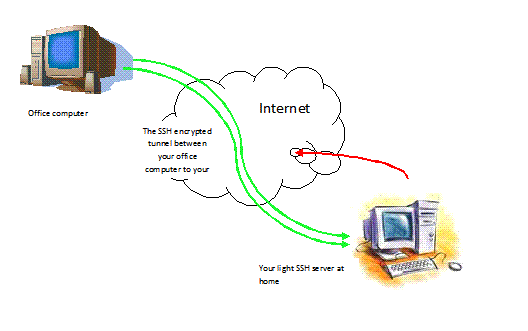
Well, as shown clearly in the picture above all that an ssh tunnel do is connect to an online ssh server that allows SSH access and create a Tunnel between the host PC(ssh client) and server by bypassing the web Filter.

As for the firewall, well it is the sadistic son of a b*tch that is prohibiting you from accessing facebook. As you see in the picture below.
Or, as Wikipedia defines it: a software-based or hardware-based and is used to help keep a network secure. Its primary objective is to control the incoming and outgoing network traffic by analyzing the data packets and determining whether it should be allowed through or not, based on a predetermined rule set.

Now after I bored you to death with my babbling here is how you can access Facebook, Youtube, ..from your work place or school :


Tuesday, December 25, 2012

How to break linux?

Broken linux


20 ways to break Linux 

Linux is a robust OS but there are still lots of ways you can trash it.

Linux has a reputation for robustness but there are still plenty of ways to damage a perfectly working system.
Here we share some of the ways you can trash Linux so you don't make the same mistakes we did.
Read the Complete article on techradar.com


I just came across this article, and I did some "Googling" and I found it to be discussed on many blogs and forums so I just wanted to write some notes about it.

First I'm gonna start by enumerating the 20 ways and you can always go back to the original article to find out more: