Showing posts with label server. Show all posts

Tuesday, February 5, 2013

Why Mega is different?


Dropbox, Box, rapidshare, filesonic, google drive and Mega are services that allow you to put your data on the cloud for free.

Now of course when we consider to put our data on the cloud, our biggest concerns is security. And whether this data is for enterprise or personal use, it always feels like compromising your privacy desire when you decide to put it on the public internet.

When uploading your data on the could, it will exposed to attacks at two points:
  • in-flight :when it is being transmitted over the security of the public internet.
  • At rest :When it is on the cloud servers. 
Like every other service, Mega employs cryptography to protect data in-flight by wrapping communication with SSL encryption. So, there is nothing new in this part.

Why Mega is different? Why I trust it?

But Mega is unique in its approach to handling encryption at rest. Instead of storing encryption keys for a client’s data within Mega’s infrastructure, Mega gives their cryptography back to their users.
So Mega users encrypt their own data after sending it to Mega’s servers, and store keys locally such that even Mega can’t read their data.

Which mean that Mega can't and is not able to hand your content to
authorities. 

In simpler words: users keep their own keys and send data in the form of encrypted cipher text rather than unencrypted plain text. And it seems like Kim is very comfortable with Mega's security since he's offering 14000$ per vulnerability.

Kim Dotcom @KimDotcom
The #Mega crypto & security REWARD PROGRAM is live. Earn up to 10,000 EURO per vulnerability. https://mega.co.nz/#blog_6

After falling victim or its success for the first few days of its launching (Overloaded servers), Mega is functionning perfectly and users are satisfied as Kim Dotcom state in a tweet that raised the question of : "What's next?"


Wednesday, January 2, 2013

WWW, WWW2, WWW3...What is the difference?

We've all seen www, www2, www3; We type for exemple 'www.company.com' and we're suddenly redirected to 'www3.company.com'. What exactly is this, and how do we get there?

Starting the domain name name of your web site with www. or www2. or www3. is a common convention and nothing more. There is nothing in the HTTP specification that says a web site must start with www. or any other prefix. It is simply a convention that began in the early days of the web and was used to distinguish a company's web server from its FTP server, gopher server, mail server, etc... But no such distinction is necessary, because this part of the URL, 'www.' help it decide how to perform this internal routing.
Usually this type of configuration is stored in your .htaccess file, located in public_html.

Load balancing

Another example is role-based routing. For example, store.company.com and developer.company.com are both hosted at company.com, but serve different roles on the web; one is an online store, the other is a site with resources for programmers. (And each is probably also load-balanced in ways that don't rewrite your URL.)

Sunday, December 30, 2012

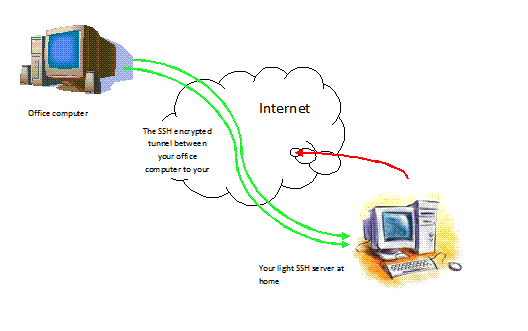
Set up your own ssh server.

In the previous post we talked a little about ssh tunnels and  and how to connect from a workstation to a server using an ssh client (puTTY) .
The ssh server we connected to last time was hosted at cjb.net, today I'm gonna show you how to host an ssh server on your own machine at home.

Thursday, December 27, 2012

How to access any blocked website using ssh tunnel?


How much do you hate it when you're at work, school, college surfing the web, trying to access some website and you get prohibited, because "they" don't want you to see the content of just because you have some work to do and you shouldn't waste your time on Facebook.

Here in this post you will learn how to bypass the web filter using ssh tunnel in 3 extremely easy steps.

Don't be so hasty now, it's not the time for you to skip to the steps. First you have to know a little about ssh tunnels and firewalls.

Well, as shown clearly in the picture above all that an ssh tunnel do is connect to an online ssh server that allows SSH access and create a Tunnel between the host PC(ssh client) and server by bypassing the web Filter.

As for the firewall, well it is the sadistic son of a b*tch that is prohibiting you from accessing facebook. As you see in the picture below.
Or, as Wikipedia defines it: a software-based or hardware-based and is used to help keep a network secure. Its primary objective is to control the incoming and outgoing network traffic by analyzing the data packets and determining whether it should be allowed through or not, based on a predetermined rule set.

Now after I bored you to death with my babbling here is how you can access Facebook, Youtube, ..from your work place or school :